> ## Documentation Index
> Fetch the complete documentation index at: https://www.anything.com/docs/llms.txt
> Use this file to discover all available pages before exploring further.
# Web
> Build and launch web apps and websites with Anything
Anything builds web apps and websites you can launch instantly. A **web app** has users, stored data, and interactivity: dashboards, marketplaces, booking tools. A **website** is more static: landing pages, portfolios, blogs. Anything handles both.
## Inspiration
Things founders build with Anything:
* AI SaaS products
* Marketplace or directory apps
* Booking and scheduling tools
* Customer portals
* Landing pages and marketing sites
* Internal tools
* Community platforms and forums
## Chat
Tell the agent you want a web app or website. You'll know it's a web project because the [app preview](/builder/controls#app-preview) fills the full screen (no device frame).
```
Build a web app for managing customer orders. Include a dashboard with a table of orders, a detail page for each order, and a settings page.
```
## Pages
Pages are the screens of your web app. Every project starts with one blank page. Add more as your app grows.
```
Add a new page called Contact
```
Manage pages from the [element selector](/builder/controls#top-bar) in the top bar — switch between pages, rename, or delete.
Split into multiple pages when:
* Different sections serve different purposes (home, about, contact)
* You want separate views for different users (customer-facing vs. admin)
* You need to [restrict access to signed-in users](/apps/auth)
## Responsiveness
Use the [responsive toggle](/builder/controls#top-bar) in the top bar to preview what your web page looks like on Desktop or Mobile web.
If something doesn't look right on one size, tell the agent:
```
Make this page responsive. On mobile, stack the cards vertically and hide the sidebar.
```
## Routes
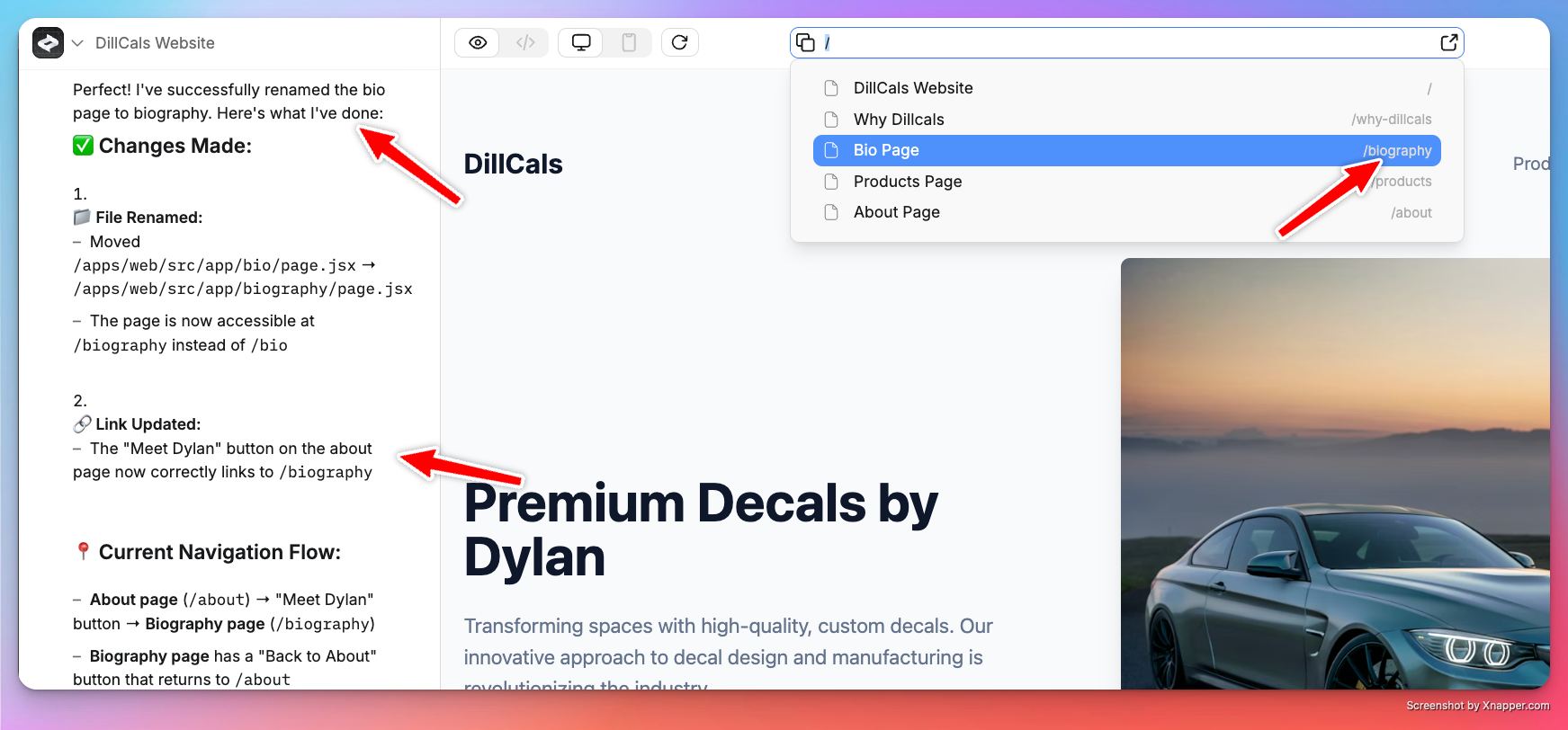
Each page lives on a route — a URL path like `/dashboard` or `/settings`. Routes appear next to the page name in the [element selector](/builder/controls#top-bar). The agent picks routes based on page names, but you can change them:
```
Rename the bio page route to /biography
```
 ## Links
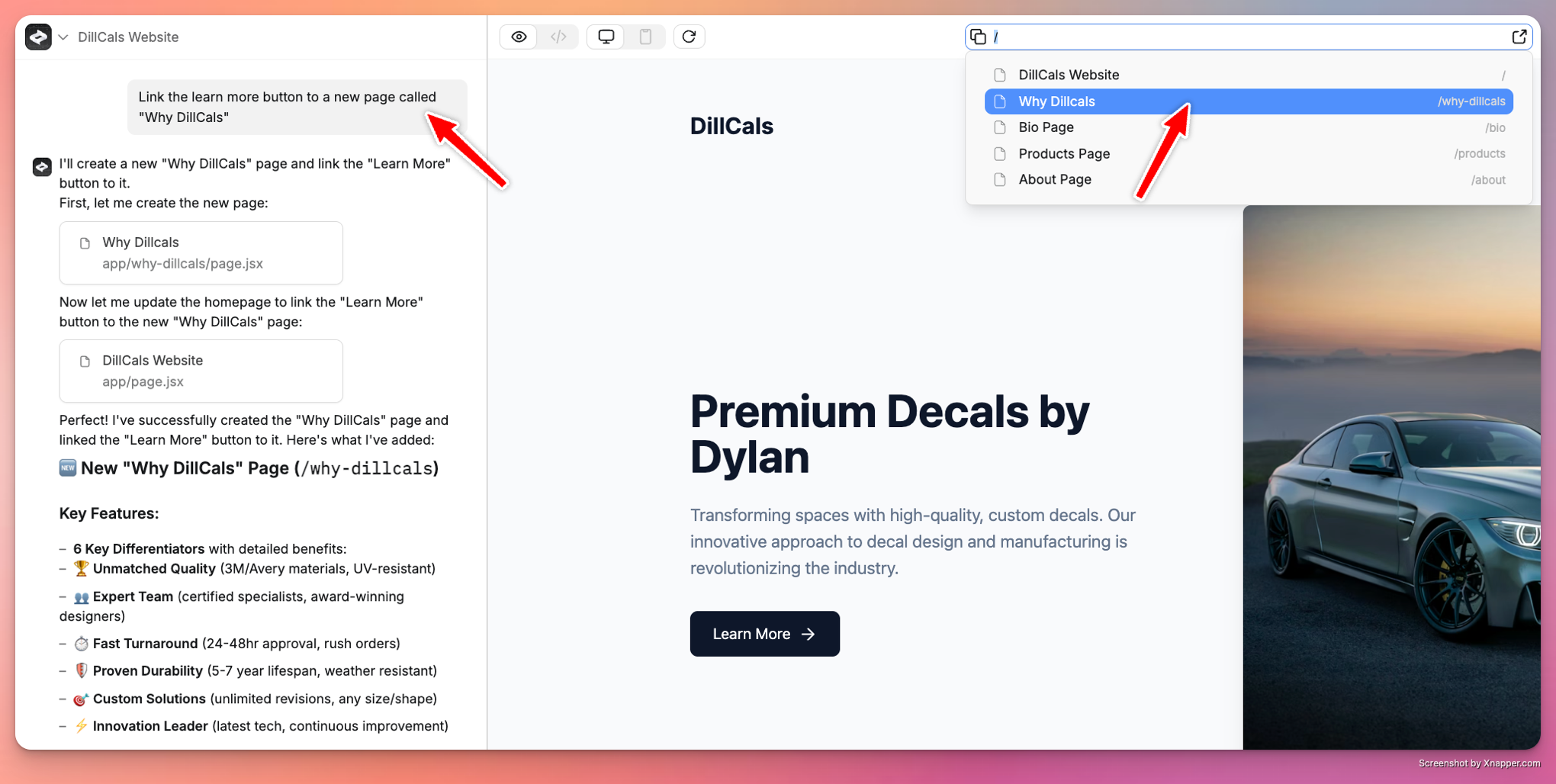
Connect pages by telling the agent how they should link:
```
When you click the profile image in the homepage, go to the bio page
```
```
On the about page, the back button should go to the home page
```
## Links
Connect pages by telling the agent how they should link:
```
When you click the profile image in the homepage, go to the bio page
```
```
On the about page, the back button should go to the home page
```
 ## Styling
Tell the agent how you want things to look. Paste screenshots, share URLs, or describe it.
```
Update the look of this entire application with a modern glass theme, style fonts similar to Apple.com
```
* **Paste screenshots:** see the [prompting guide](/prompting#use-images)
* **Share URLs:** Anything screenshots the page and uses it as reference
## Publishing
Click **Publish** in the top right to go live. See the [publishing guide](/launch/publish).
1. Click **Publish** in the top bar
2. Choose your domain or use the free Anything subdomain
3. Set up a [custom domain](/launch/domains) if you want one
4. Re-publish after changes to push updates live
Pages stay private until you publish. Use [Preview mode](/builder/controls#top-bar) to test first.
## Assets
Upload images and files in [Project Settings](/builder/controls#project-settings) under **Assets**. Reusable across all pages.
You can also paste images into the chat to add them to a page.
## Going further
Every Anything web app has built-in support for:
* **[User accounts](/apps/auth)** — `Add login with Google and email sign up`
* **[Payments](/payments/stripe)** — `Add checkout for a $20/month subscription`
* **[Database](/apps/databases)** — `Save orders and show them in a table`
* **[Backend](/apps/backend)** — `Send a welcome email when someone signs up`
* **[File uploads](/apps/uploads)** — `Let users upload a profile photo`
* **[Integrations](/apps/integrations)** — `Add an AI chatbot that answers customer questions`
## How it works
Anything generates React code for web apps. You don't need to know React — but if you're curious, view the code in [Code mode](/builder/controls#top-bar).
## Styling
Tell the agent how you want things to look. Paste screenshots, share URLs, or describe it.
```
Update the look of this entire application with a modern glass theme, style fonts similar to Apple.com
```
* **Paste screenshots:** see the [prompting guide](/prompting#use-images)
* **Share URLs:** Anything screenshots the page and uses it as reference
## Publishing
Click **Publish** in the top right to go live. See the [publishing guide](/launch/publish).
1. Click **Publish** in the top bar
2. Choose your domain or use the free Anything subdomain
3. Set up a [custom domain](/launch/domains) if you want one
4. Re-publish after changes to push updates live
Pages stay private until you publish. Use [Preview mode](/builder/controls#top-bar) to test first.
## Assets
Upload images and files in [Project Settings](/builder/controls#project-settings) under **Assets**. Reusable across all pages.
You can also paste images into the chat to add them to a page.
## Going further
Every Anything web app has built-in support for:
* **[User accounts](/apps/auth)** — `Add login with Google and email sign up`
* **[Payments](/payments/stripe)** — `Add checkout for a $20/month subscription`
* **[Database](/apps/databases)** — `Save orders and show them in a table`
* **[Backend](/apps/backend)** — `Send a welcome email when someone signs up`
* **[File uploads](/apps/uploads)** — `Let users upload a profile photo`
* **[Integrations](/apps/integrations)** — `Add an AI chatbot that answers customer questions`
## How it works
Anything generates React code for web apps. You don't need to know React — but if you're curious, view the code in [Code mode](/builder/controls#top-bar).